
I am thrilled to announce the release of Chess Analyzer Pro v1.0, a powerful, open-source desktop application designed to bring premium-level chess analysis to everyone—for free. Built with Python and modern GUI technologies, it combines the raw power of Stockfish with the intuitive aesthetics of modern web platforms.
The Need: Why Build Another Chess Analyzer?
As a chess enthusiast, I often found myself torn between two worlds. On one hand, online platforms like Chess.com offer beautiful, easy-to-understand "Game Reviews" with brilliant move highlights and accuracy scores—but these features are often locked behind expensive monthly subscriptions. On the other hand, free desktop tools (GUIs) often feel outdated, clunky, or overly technical, presenting raw engine lines that are hard for the average player to digest.
I wanted a middle ground: The power of a desktop engine combined with the visual elegance and "coach-like" feedback of premium online services.
Thus, Chess Analyzer Pro was born.
Project Overview
Chess Analyzer Pro is a full-stack desktop application that parses your games (PGN), analyzes them move-by-move using the Stockfish engine, and presents the data in a rich, interactive format. It’s designed to be fast, privacy-focused (running locally), and visually engaging.

Key Features in v1.0
1. Professional-Grade Analysis
At its core, the application leverages Stockfish, the world's strongest chess engine.
- Depth-Based Analysis: Configured to run deep searches (Depth 18+) for consistent and accurate evaluations.
- Win Probability: Converts raw centipawn evaluations into understandable win percentages.
- Accuracy Scores: Calculates "Game Accuracy" (CAPS-style) for both White and Black, giving you an objective measure of your performance.
2. Stunning Visualizations
We moved away from boring text logs to create a visual storytelling experience.
- Interactive Evaluation Graph: A beautiful, responsive graph that tracks the game's flow. It features a scatter plot style similar to top chess sites, highlighting key moments with colored markers (Green for Best, Red for Blunder, Blue for Brilliant).
- Clamped Scaling: The graph intelligently scales (clamped to +/- 4 pawns) so that one massive blunder doesn't flatten the rest of the game's visual curve.
- Tooltips: Hover over any point in the graph to see the exact evaluation and move number instantly.

3. "Game Review" Style Move List
The move list isn't just a list of notations; it's a report card.
- Move Classification: Every move is classified (Best, Excellent, Good, Inaccuracy, Mistake, Blunder, Missed Win).
- Visual Cues: Moves are color-coded and icon-stamped (e.g.,
!!for Brilliant,??for Blunder), making it easy to scan a game for turning points. - Rich Feedback: The UI clearly separates White and Black moves, ensuring readability even in long games.
4. AI-Powered Insights
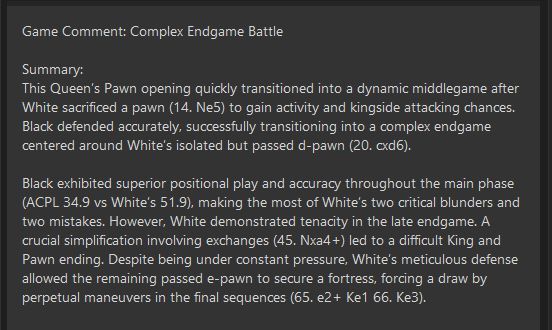
One of the standout features of v1.0 is the integration of Generative AI (via Google Gemini).
- Natural Language Summary: Instead of just numbers, get a "Coach's Comment" on the game. The AI analyzes the PGN and stats to tell you if the game was "Sharp and Tactical" or a "Slow Positional Grind."
- Key Moments: It summarizes where the game was won or lost in plain English.
Getting Started
1. Installation & Configuration
Chess Analyzer Pro is designed to be plug-and-play, but it needs two key components to unleash its full potential:
Setting up Stockfish (The Engine)
- Download the latest Stockfish engine for your OS from stockfishchess.org.
- Open Chess Analyzer Pro.
- Go to Settings > Engine Path.
- Select the Stockfish executable you just downloaded.
- Note: The app remembers this path, so you only do it once.
Enabling AI Summaries (Optional but Recommended)
To get the "Coach's Comment" feature:
- Get a free API key from Google AI Studio.
- In the app, go to Settings > Gemini API Key.
- Paste your key.
- Privacy Note: Your key is stored locally in
config.jsonand never shared.
- Privacy Note: Your key is stored locally in
2. Loading Your Games
Chess Analyzer Pro offers three convenient ways to import your games:
- Load PGN File: Have a
.pgnfile saved? Click File > Open PGN to load it. You can even load multi-game PGNs and switch between them using the sidebar. - Chess.com Username: Want to analyze your recent matches? Enter your Chess.com Username to automatically fetch and load your last 5 games.
- Match URL: Analyzing a specific game? Simply paste the Chess.com Game URL, and the app will retrieve the PGN for you.
3. Understanding the Analysis
Once a game is loaded:
- The Graph: Watch the evaluation curve. Spikes up mean White is winning; spikes down favor Black.
- The Move List: Scroll through the moves. Look for the colored icons:
- 🟢 Green Star: Best Move
- 🔴 Red Question Mark: Blunder (Big mistake!)
- 🔵 Blue Exclamation: Brilliant Move
- The Report: Click the "Report" tab to see your accuracy score and read the AI's summary of your performance.
Under the Hood
For the technically curious, Chess Analyzer Pro is built using a robust modern stack:
- Language: Python 3.10+
- GUI Framework: PyQt6 (for a native, responsive desktop experience)
- Engine Management:
python-chesslibrary for PGN parsing and engine communication. - Plotting: Matplotlib (customized for real-time interactive graphing).
- Concurrency: Multithreaded architecture ensures the UI never freezes while the engine crunches millions of positions in the background.
Future Roadmap
Version 1.0 is just the beginning. Here is what is planned for the near future:
- Opening Explorer: Integrated book moves to see where you deviated from established theory.
- PDF Export: Generate a printable "Game Report" to study offline.
- Batch Analysis: Analyze entire tournaments or PGN databases in one go.
- Theme Customization: More board themes and piece sets to suit your style.
Download & Try It
Chess Analyzer Pro is available now. Download it, load your games, and start uncovering the secrets in your play today.
Update: Where We Are Now (v1.6)
Since the initial launch of v1.0, Chess Analyzer Pro has evolved rapidly, driven by community feedback and a relentless focus on user experience. We are now at Version 1.6, Here is what has changed since the first release:
1. Unified Chess Ecosystem
We broke down the walls between platforms. You aren't just limited to Chess.com anymore.
- Lichess Integration: Seamlessly load games from any Lichess username or URL.
- Universal Import: Paste PGN text directly from your clipboard or import your entire history via CSV backups to keep your data safe.
2. Deep Performance Insights (Stats Dashboard)
We added a dedicated Stats Page to help you track your long-term progress.
- Move Quality Breakdown: See a visual distribution of your Brilliant moves vs. Blunders.
- Opening Explorer: Visualize which openings you play most frequently and how well you score in them.
- Performance by Color: Compare your win rates and accuracy with White vs. Black.
3. A More Personal Experience
The app now adapts to your style.
- Themes & Customization: Choose from multiple board themes and piece sets to match your aesthetic preference.
- Smart "Coach" Logic: We refined the move classification engine. "Great" moves are now rarer and more meaningful, and we introduced a new "Miss" classification for missed wins and mates, giving you clearer feedback on critical moments.
4. Professional Polish
Version 1.6 introduces the level of polish you expect from premium software.
- Auto-Updates: The app now self-checks for updates, ensuring you're always on the latest version.
- Keyboard Shortcuts: Navigate games faster with arrow keys, flip the board with
F, and search history instantly. - Enhanced Histoy: Your game list now supports powerful search and filtering (by Result, Player, or Source), making it a personal database of your chess journey.
Links & Resources
Ready to upgrade your analysis?
- Download the Latest Version: GitHub Releases
- Official Website: chess-analyzer-ut.vercel.app
- Source Code: GitHub Repository
- Report a Bug: Issues Tracker